
Product Landscape Canvas: Setting Your Product Boundaries
Ever found yourself in a conversation where someone asks "What exactly is your product?" and you're not sure how to answer?
Maybe you mostly know the work you're accountable for but when it comes to making decisions about what's in and what's out, and what you actually own, it gets fuzzy fast.
This is especially true if you're moving from a project delivery world where the business and IT are separate. Now you're expected to think like a Product Owner but the landscape isn't clear. Dependencies keep popping up that you didn't know existed. People keep expecting you to know and make decisions about things that may feel outside your scope.
The Product Landscape Canvas is our way of making visible what you're actually accountable for and how it all connects. It helps Product Owners, Business Value Stream owners and delivery leaders set clear boundaries and see their whole landscape at a glance.
What is a Product Landscape Canvas?
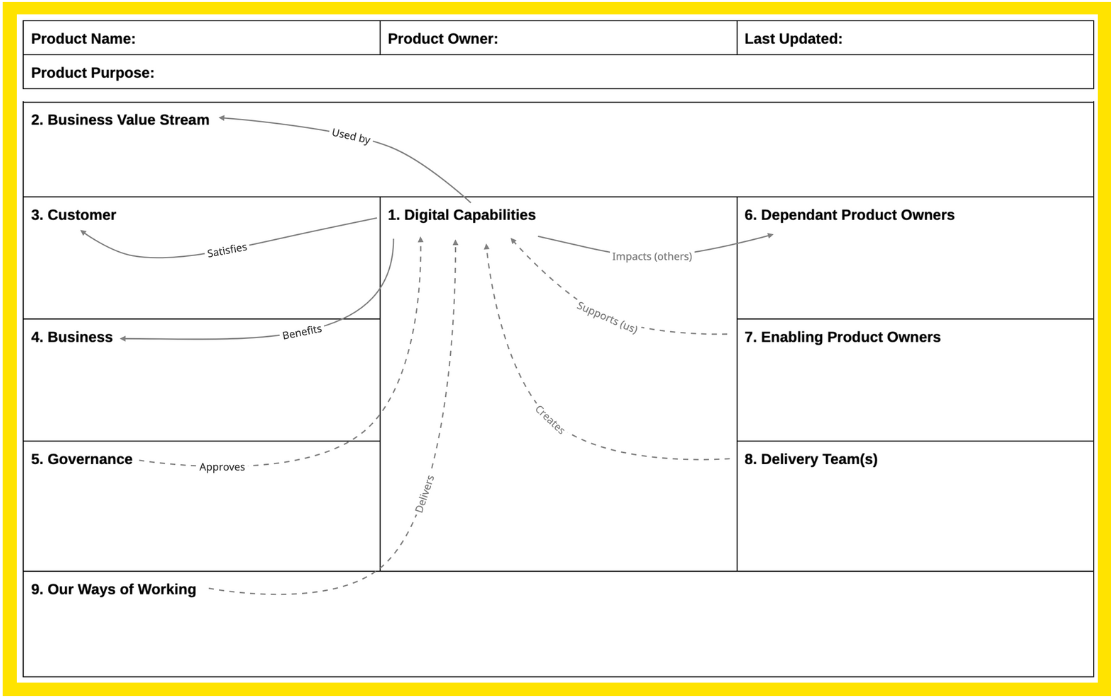
A Product Landscape Canvas is a single-page visual that helps you explore the boundaries of your digital product accountability and people relationships.
It takes a customer-centric view of what a product is. In other words if you asked our customer what our products or services are, we want our definition to closely align with their response.
The Product Landscape Canvas defines the WHAT and WHERE - summarising the Digital Capabilities that define your product functionality and the business/customer context in which they are used by customers and the wider product community.
It also focuses strongly on the WHO - all the people and groups in your product community that you need to establish working relationships with:
the people that want your product; Customers, Business and Governance.
the people needed to build your product and the skills they bring to the Product Delivery Teams.
other Product Owners that use or maintain your data outside your product.
It also captures the HOW - your way of working, how your product community will collaborate to turn new ideas into future digital product capabilities.
Think conversation starter, not detailed documentation. The Product Landscape Canvas gives you just enough structure to have clarity without drowning in process charts.
We initially developed this RAFT to help teams make the journey from internally project-focused business demand and IT supply thinking, towards customer-centric one team product thinking. In these more traditional organisations, one part initiates work (Demand) and another part delivers it (Supply). The Product Landscape Canvas helps you see the whole picture from a Product Owner's perspective, making visible what exists now and where the boundaries sit.
It is now a standard RAFT that we use in all our coaching for both new and experienced Product Owners.
Why We Love It
The Product Landscape Canvas shifts the conversation by:
Creating a shared view of what's in and out of your scope.
Surfacing hidden dependencies before they become blockers.
Giving you a clear answer when someone asks "what do you own?"
Building a common language between delivery teams, business stakeholders and leaders.
Showing gaps in coverage or areas where ownership is unclear.
Helping new team members understand the landscape quickly.
Providing context for prioritisation and roadmap decisions.
When We Use It
We reach for the Product Landscape Canvas when:
A new Product Owner needs to understand their scope.
Teams are transitioning from project to product thinking.
There's confusion about who owns what.
Dependencies keep surprising the team mid-delivery.
Stakeholders aren't clear on boundaries.
You're setting up a new product or value stream structure.
Someone needs to explain "what we do" to leadership or new starters.
It's especially powerful in a Product Owner’s journey when they first join an organisation or are new to the role and still working out what they are accountable for.
How We Do It
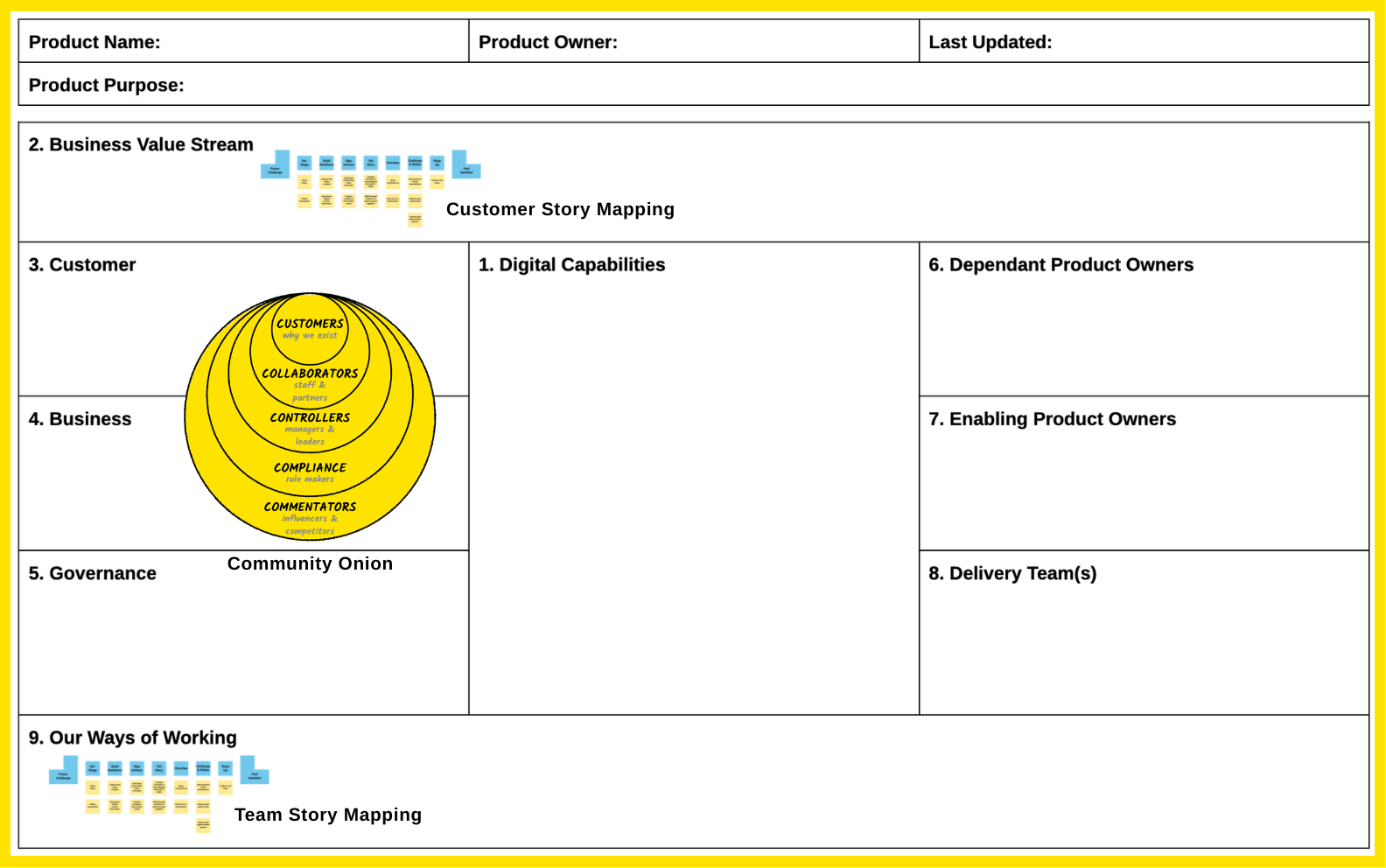
We typically start small with a conversation between Product Owners or a small trusted group. Focus on what can be answered quickly, then identify the people who can help with the trickier questions.
The canvas is numbered to give a logical starting sequence. Some boxes fill quickly, others need wider conversation. That's normal.
The beauty of the canvas is that it brings together many of our other RAFTs in one place:
We use brainstorming for Digital Capabilities - we start with three questions: What product-related questions do people ask? What problems and issues do people raise? What changes do people request? Theme the answers.
We use Story Mapping for the Business Value Stream - a customer story map shows exactly where the digital capabilities get used in the real flow of work.
We use the Community Onion to populate Customers, Business and Governance - the seven layers map onto these three boxes and help see who really matters.
We talk to Product Owners for dependencies - identify where the product's data is used or maintained by other products. We look at value stream boundaries and ask technical people about integrations.
We map the Delivery Team - identify the skills and people needed, including technology partners.
We use Story Mapping again for the Way of Working - this time mapping the team's delivery process from idea to production.
Where it’s a shared platform, we create a separate canvas for the platform itself to capture all the enabling services everyone depends on.
Things to Look Out For
Don't aim for perfection - this is a conversation tool, not a contract. Good enough to create clarity is the goal.
This isn't a solo desk exercise - the real value comes from gathering the right people and having conversations.
Dependencies will surprise you - expect to discover relationships you didn't know existed. That's the point.
Accountability creep will show up - if people keep adding digital capabilities, you've found a boundary issue worth discussing.
Ownership gaps become visible - blank sections or overlaps often reveal structural issues that need addressing.
Update it regularly - landscapes shift. Revisit quarterly or when significant changes happen.
Keep it visual - use the canvas format rather than turning it into a document or spreadsheet. The visual nature is what makes it a useful collaboration tool.
Try It With Your Team
Print out the template and spend 30-45 minutes working through the nine boxes on your own. Leverage our other RAFTs to help find your answers.
Gaps will surface areas that require further investigation and conversations with your team.
Our RAFT Series
✦ Our CoLab RAFTs - Rapid Agile Forecasting & Tracking skills - are practical tools we use every day in our coaching and training to help teams make work visible and performance-focused.
Curious? Let’s talk toni@agilecolab.com
Version 1, last updated 4 December 2025